Opening a DeFi wallet is a lot like getting your first bank account, except you are the only one in charge. No branch manager can reset your password. No fraud department can reverse a transaction. That freedom is powerful, but it also means the responsibility for security rests entirely on your shoulders. The good news is that setting up a wallet safely is not complicated once you know the right steps. This guide will walk you through exactly how to set up a DeFi wallet safely, so you can start exploring decentralized finance without losing sleep over hacks.
Your DeFi wallet is a self-custody tool, meaning you alone control the private keys. The single most important rule is to never share your seed phrase with anyone and never store it digitally. Use a hardware wallet for larger amounts, always double-check transaction URLs, and start with small test transactions. Security is not a one-time setup; it is a habit.
Pick the Right Wallet for Your Needs
Not all wallets are created equal. The first decision you need to make is whether to use a software wallet (often called a hot wallet) or a hardware wallet (a cold wallet). If you plan to hold more than a few hundred dollars in crypto, you should seriously consider a hardware wallet.
Software wallets like MetaMask, Trust Wallet, or Rainbow Wallet are free and easy to install as browser extensions or mobile apps. They are great for small amounts and daily transactions. But because they are connected to the internet, they are more vulnerable to malware and phishing attacks.
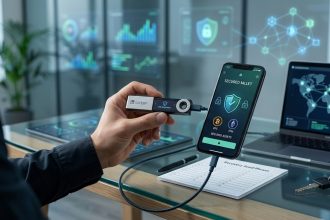
Hardware wallets like Ledger or Trezor store your private keys offline on a physical device. They cost between $50 and $200, but they provide a much higher level of security. Think of a hardware wallet as a safe for your crypto, while a software wallet is more like your everyday wallet.
Here is a quick comparison to help you decide:
| Wallet Type | Best For | Security Level | Cost | Example Use Case |
|---|---|---|---|---|
| Software (Hot) | Small daily transactions | Moderate | Free | Swapping tokens on Uniswap |
| Hardware (Cold) | Long-term storage and large amounts | High | $50 to $200 | Storing your savings in stablecoins |
| Mobile App | On-the-go access | Moderate | Free | Checking balances and small sends |
| Browser Extension | Interacting with DeFi protocols | Low to moderate | Free | Connecting to a lending platform |
If you are just getting started, download a reputable software wallet from the official website or app store. Avoid third-party links. For more details on this trade-off, check out our guide on how to choose between hot wallets and cold wallets for your crypto.
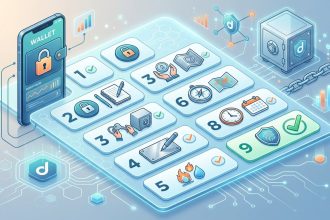
Step 1: Download Only From Official Sources
This is where most beginners get into trouble. Scammers create fake wallet apps that look identical to the real thing. They can steal your seed phrase the moment you create a wallet.
- Go directly to the official website of the wallet provider. Do not search for “MetaMask download” on Google and click the first ad. Ads can be malicious.
- Verify the URL. For example, the real MetaMask website is metamask.io, not metamask.download or some misspelled version.
- If you are on a mobile device, use the official app store. Check the developer name and the number of downloads. A legitimate wallet will have millions of downloads and thousands of reviews.
- Avoid downloading wallet extensions from random browser stores. Stick to the Chrome Web Store or Firefox Add-ons, but still verify the publisher.
Expert advice: Always bookmark the official website after you download. Scammers often create lookalike sites that rank high in search results. A bookmark is your safest way back.
Step 2: Create and Secure Your Seed Phrase
Your seed phrase is a list of 12 or 24 random words. It is the master key to your wallet. If someone gets your seed phrase, they get your crypto. Period.
When you create a new wallet, the application will show you your seed phrase. Write it down on paper immediately. Do not take a screenshot. Do not type it into a note app. Do not email it to yourself.
- Write the words in the exact order shown.
- Double-check each word for spelling errors.
- Store the paper in a safe place, like a fireproof safe or a safety deposit box.
- Consider making a second copy and storing it in a different location.
For a deeper dive on this critical step, read our article on how to safely store your seed phrase without digital backups. And if you want a complete checklist, the ultimate seed phrase backup checklist has you covered.
Step 3: Set a Strong Password and Enable Biometrics
Most software wallets also let you set a local password or PIN. This password protects the wallet app on your device. It is not the same as your seed phrase. If someone steals your phone, this password stops them from opening your wallet.
- Use a password manager to generate a random, complex password.
- Never reuse passwords from other accounts.
- Enable fingerprint or face recognition if your device supports it.
Step 4: Start With a Small Test Transaction
Before you move any significant amount of crypto into your new wallet, test it with a tiny amount. This confirms that the wallet is set up correctly and that you can send and receive funds.
- Buy a small amount of a stablecoin like USDC or DAI on a centralized exchange like Coinbase or Kraken.
- Withdraw that small amount to your new wallet address.
- Confirm the transaction on the blockchain explorer.
- Send a tiny amount back to the exchange to practice sending.
This test transaction also helps you understand gas fees and transaction times. If something goes wrong, you lose only a few dollars instead of your entire savings. For more context on how these transactions work, see our explanation of what are smart contracts and why do they matter in DeFi.
Step 5: Connect to DeFi Protocols With Caution
Once your wallet has funds, you can connect it to DeFi protocols like Uniswap, Aave, or Compound. But every connection carries risk.
- Only connect to well-known, audited protocols.
- Check the URL carefully before signing any transaction.
- Use a dedicated wallet for DeFi interactions. Keep your long-term savings in a separate wallet that never connects to any app.
- Revoke unused token approvals regularly. Tools like Revoke.cash can help you clean up permissions.
This approach is often called “compartmentalization.” It is one of the most effective ways to limit damage if a protocol gets hacked. For a full security framework, refer to the complete DeFi security checklist for beginners.
Common Mistakes That Lead to Hacks
Let us look at the most frequent errors beginners make. Avoiding these will keep you safe from the vast majority of attacks.
- Storing seed phrases digitally. This includes photos in your gallery, text files on your desktop, and cloud storage services.
- Connecting to unknown dApps. If a random website asks you to connect your wallet, do not do it.
- Signing blind transactions. Always read what the wallet is asking you to approve. If it looks suspicious, reject it.
- Using the same wallet for everything. Have one wallet for daily DeFi use and another for long-term storage.
- Falling for airdrop scams. If someone sends you free tokens and asks you to “verify your wallet” by signing a message, it is a trap.
Your Security Routine for 2026 and Beyond
Setting up your wallet safely is not a one-time event. It is an ongoing practice. Here is a simple routine to follow:
- Every month, check your wallet’s connected apps and revoke any permissions you no longer use.
- Every quarter, review your seed phrase storage to make sure the paper is still readable and safe.
- Every time you interact with a new protocol, start with a tiny test amount.
- Keep your wallet app updated. Developers release security patches regularly.
For a broader understanding of the risks you face, read about 5 hidden risks every DeFi beginner should know before investing and learn how to protect yourself from DeFi rug pulls and exit scams.
Build Your Confidence With Safe Habits
The scariest part of DeFi is the responsibility. But that same responsibility gives you total control over your money. No bank can freeze your account. No government can block your transactions. That is worth protecting.
Start small. Use a hardware wallet for anything over a few hundred dollars. Keep your seed phrase offline and on paper. Always double-check URLs before signing. And never, ever share your private keys.
You now know how to set up a DeFi wallet safely. Take the next step with confidence. Your future self will thank you for being careful today.